One Update Away From a Breach
Verified badges, 4-star reviews, silent updates: how browser extensions became a supply-chain risk, and how to govern the layer nobody approved.
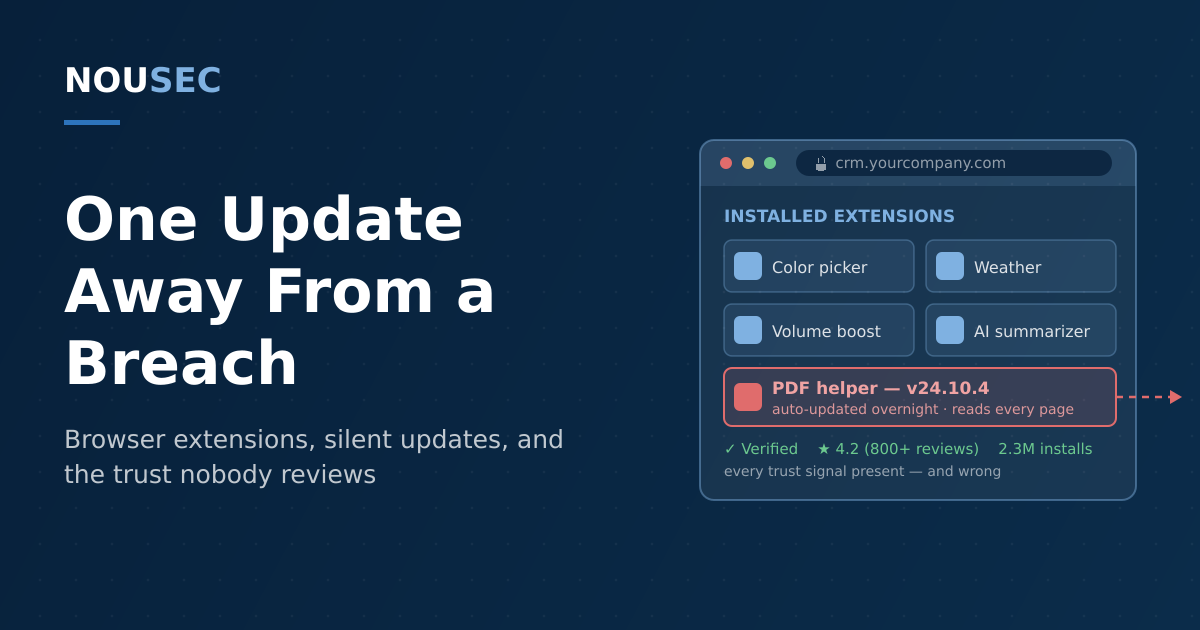
Your organization reviews its vendors, audits its SaaS, and gates software installs behind IT approval. Then an employee adds a volume booster to Chrome in four seconds, and software nobody vetted is reading every page they open — mail, CRM, admin consoles — with standing permission to phone home. Browser extension telemetry from LayerX's 2026 Browser Extension Security Report puts the scale plainly: 99% of enterprise users run at least one extension, and more than a quarter run over ten.
The browser has quietly become the place where most work happens — and, as we wrote when AI agents moved into it, where most trust decisions now get made. Extensions are the oldest version of that problem: small, convenient, self-installed programs that sit inside the authenticated session and inherit everything the user can see. What has changed is that attackers have industrialized two ways of weaponizing them — compromising the people who publish legitimate extensions, and patiently building legitimate-looking ones that turn.
A phishing email, a consent screen, 400,000 browsers
On December 24, 2024, a phishing email arrived at the publicly listed support address of Cyberhaven — a security company. It claimed the company's Chrome extension violated store policy and risked removal. The link led not to a fake login page but to a real Google authorization screen, requesting access for an attacker-controlled OAuth app named "Privacy Policy Extension." An employee, moving fast before the holiday, clicked approve.
That single consent granted the attacker the right to publish new versions of the extension. Within hours, a malicious build — version 24.10.4 — passed Chrome Web Store review and began rolling out automatically to roughly 400,000 users. According to Obsidian Security's analysis, the implant fetched instructions from a command-and-control server and harvested Facebook access tokens, cookies, and account details, targeting users with access to Facebook Ads accounts.
The developer did everything right by the traditional checklist: MFA on, Google Advanced Protection enabled. The attacker never needed the password — they asked for the keys through a consent screen, and got them.
MFA never entered the picture because consent phishing attacks authorization, not authentication — the same mechanic we unpacked in our guide to OAuth consent phishing. And Cyberhaven was not the real story: Infosecurity Magazine reported that researchers at ExtensionTotal traced the same campaign across at least 36 compromised extensions with as many as 2.6 million affected users. The attackers hadn't found one careless developer. They had found a repeatable process: extension publishers are publicly listed, reachable by email, and one consent screen away from a distribution channel into millions of browsers.
When good extensions go bad
The second playbook needs no compromise at all — just patience. In July 2025, researchers at Koi Security disclosed the campaign they named RedDirection: 18 extensions across the Chrome Web Store and Microsoft Edge Add-ons, totaling over 2.3 million installs, all quietly tracking users' browsing and capable of redirecting their sessions on command — a textbook case of browser hijacking at marketplace scale.
What makes RedDirection instructive is how respectable the extensions looked. They did real, useful things — color picking, weather, volume boosting, VPN proxying — and some had been clean for years before malware arrived in a routine version update that both stores installed silently. The lead example, a color picker, carried Google's verified badge, featured placement, and a 4.2-star average across more than 800 reviews. Every trust signal an employee is told to check was present, and every one of them was wrong.
This is the structural problem with the extension model: installation is a one-time decision, but trust is continuous. The thing you approved is not the thing you are running six updates later — and unlike the classic man-in-the-browser trojans that had to infect the endpoint first, a hijacked extension gets distributed, updated, and trusted by the marketplace itself.
The blind spot, measured
Two 2026 telemetry reports — both vendor data, so read them as directional bands rather than census figures — sketch the size of the gap between how much extensions can do and how little anyone governs them.
| What the telemetry shows | Figure | Source |
|---|---|---|
| Enterprise users running at least one extension | 99% | LayerX, Browser Extension Security Report 2026 |
| Enterprise users with an AI extension installed | ~1 in 6 | LayerX 2026 |
| AI extensions with access to cookies (vs. average extensions) | 3× more likely | LayerX 2026 |
| Extensions not updated in over a year | ~40% | LayerX 2026 |
| Extensions with fewer than 10,000 users (thin accountability) | ~1 in 3 | LayerX 2026 |
| Installed extensions rated High or Critical risk | 13% | Keep Aware, State of Browser Security 2026 |
| Share of browser-based attack detections involving suspicious or malicious extensions | 19% | Keep Aware 2026 |
The AI rows deserve attention because they compound two trends. Keep Aware's 2025 telemetry found malicious or suspicious extensions were its second-largest browser threat category after phishing — and LayerX found AI extensions, the fastest-growing segment, are three times more likely to access cookies (session tokens, which is to say session hijacking material) and nearly six times more likely to have changed their permissions in the past year. The extension your employee installed to summarize pages may have quietly acquired the rights of an infostealer since anyone last looked.
Why this is a human risk problem
It is tempting to file extensions under endpoint security and move on. But look at where each failure actually happened. Cyberhaven: a person with publishing rights approved an OAuth consent under time pressure — a social engineering failure. RedDirection: millions of people judged safety by ratings and badges, because that is the only signal the store gives them — a trust-calibration failure. The ungoverned sprawl itself: thousands of individual install decisions made without policy, visibility, or review — shadow IT in its most granular form. The Verizon 2026 DBIR's finding that 62% of breaches involve the human element doesn't stop at the inbox; it extends to every consent screen and install button.
That means the fixes are human-layer controls as much as technical ones.
1. Inventory before policy. You cannot govern what you haven't seen. Use enterprise browser management (Chrome Browser Cloud Management, Edge management, or equivalent) to pull a central inventory of every installed extension, its version, and its permissions. Expect surprises.
2. Treat permissions as the risk signal. An extension that wants cookies, scripting, or read access on all sites should need a business justification, whatever its star rating. Tier your response: allow low-permission tools, review high-permission ones, block the unjustifiable.
3. Allowlist and watch the updates. Move from blocklisting known-bad to allowlisting what the business needs — and remember RedDirection: review is not one-time. Flag permission changes on update, and prune the roughly 40% of extensions that are no longer maintained; abandoned extensions are acquisition targets for exactly these campaigns.
4. Harden the people who publish. If your company ships an extension, an integration, or any marketplace app, the accounts that can push updates are crown jewels. Train those teams specifically on consent phishing — the lesson of Cyberhaven is that a phishing simulation program built only around credential pages misses the consent-screen variant entirely.
5. Teach trust calibration, not store hygiene. Awareness content that says "check the reviews before installing" is now actively misleading. Teach what extensions can do, which permissions matter, and that verified badges failed; make "ask before installing high-permission tools" the norm rather than the exception.
6. Fold it into measurement. Install behavior, permission exposure, and response to consent-style lures belong in your human risk score alongside phishing results — because the employee who installs anything with a nice icon is telling you something measurable about risk before any attacker does.
The four-second decision
An extension install is one of the smallest decisions an employee makes and one of the most durable grants of trust in your environment: software from an often-anonymous publisher, running inside every authenticated session, with a standing right to change what it does. Attackers have noticed that this trust renews silently with every update while your review — if there was one — happened once, years ago. Close that gap the way you close every human-layer gap: see the behavior, set the norm, train the judgment, and measure whether it is changing.
Frequently asked questions
Are browser extensions safe to use at work?
Most are harmless, but the category carries structural risk that app stores do not solve. Extensions run inside the browser with whatever permissions they were granted — often the ability to read every page, access cookies, and inject scripts — and they update silently, so an extension that was clean when installed can turn malicious years later without anyone clicking anything. The RedDirection campaign disclosed in July 2025 hid spyware behind 18 extensions with over 2.3 million installs, some carrying Google's verified badge and featured placement. The practical answer is governance: inventory what is installed, allowlist what the business needs, and treat high-risk permissions as the signal they are.
How can you tell if a browser extension is malicious?
Often you cannot — not from the store page. Ratings, reviews, install counts, and even marketplace verification badges have all been present on extensions that were later caught stealing data. More useful signals are the permissions requested (access to cookies, to all sites, or to inject scripts should be justified by the extension's function), the publisher's identity and track record, whether the extension is still maintained, and whether its permissions have changed in a recent update. For organizations, the honest answer is tooling plus process: browser management that inventories extensions centrally and flags risky permissions beats asking each employee to judge a store listing.
Can MFA stop extension supply-chain attacks?
Not the ones that matter most. In the December 2024 Cyberhaven incident, the compromised developer had MFA and Google's Advanced Protection enabled. The phishing email led to a legitimate Google consent screen for a malicious OAuth app — and consent flows are authorization, not authentication, so no second factor was ever challenged. One approved dialog gave the attacker the right to publish extension updates, and a malicious version went out to roughly 400,000 users. The defense is scrutiny of OAuth grants and of the publishing workflow itself, plus training the people who hold publishing rights to treat consent screens with the same suspicion as login pages.
Should companies ban browser extensions entirely?
Blanket bans tend to fail the way all blanket software bans do: work moves to unmanaged browsers and personal devices where security has no visibility at all. A workable middle ground is tiered governance — block known-bad and unmaintained extensions, allowlist the ones with a business case, require review for high-risk permissions, and use enterprise browser management to enforce it centrally. Pair that with awareness training that covers what extensions can actually do, so the engineer installing a color picker understands they are granting software a seat inside every logged-in session they have.
NOUSEC simulates attacks across 8 channels and turns the results into one number your board can read.
Book a demo