The Top of the Page Is for Sale
Employees trust the top search result; attackers pay to be there. How poisoned ads and rankings deliver malware, and the habits that break the chain.
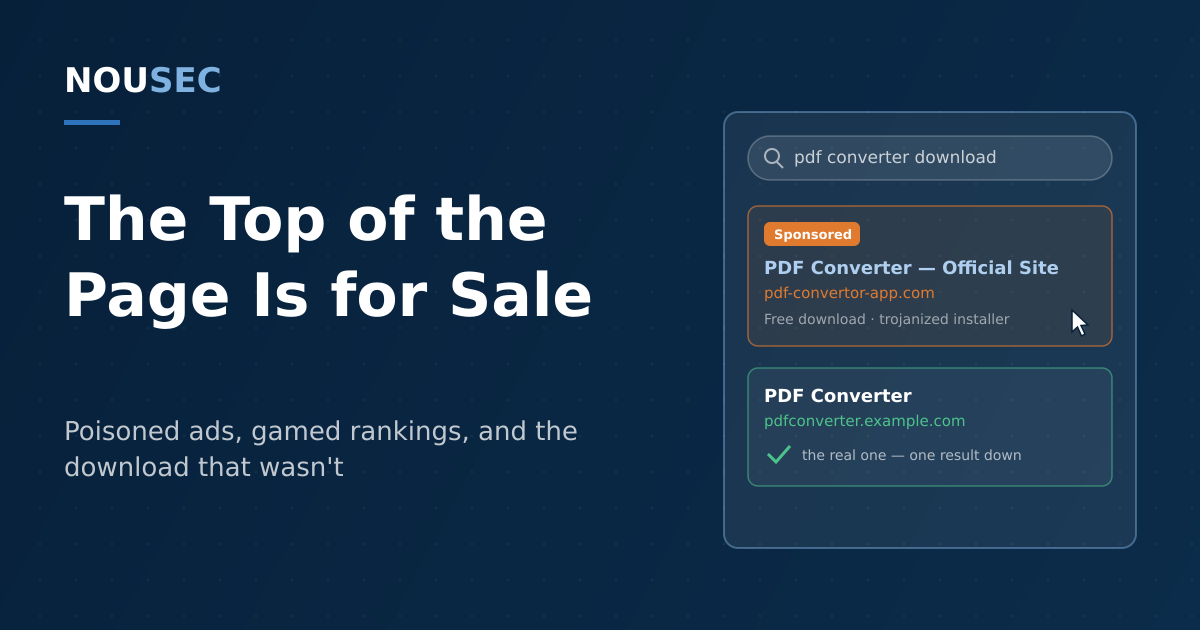
An employee needs a PDF converter, or a VPN client, or last year's non-disclosure agreement template. They do exactly what security training taught them: they don't click a link in an email, they go and find the official source themselves. Into the search bar goes the product name; back comes a results page; the top entry looks right; click, download, run. The habit feels careful. The problem is that the top of a results page is not a recommendation — it is inventory. It can be bought by anyone with an ad account, and gamed by anyone with patience.
That is the territory of two techniques that increasingly do the job phishing emails used to do. Malvertising abuses legitimate advertising networks to place malicious entries in sponsored slots — above the organic results an employee thinks they are reading. SEO poisoning manipulates the organic rankings themselves, pushing attacker-controlled pages up the unpaid results through keyword stuffing, link networks, and compromised reputable sites. Both deliver the same payloads — trojanized installers, credential-harvesting pages, fake support lines — to a victim who came looking for them. Defense is a mix of removing the reason to search, changing the retrieval habit, and filtering what the habit misses.
The safety habit that became an attack surface
"Go to the site yourself instead of clicking the link" has been standard security advice for two decades, and attackers have noticed that it funnels victims toward a predictable place. The FBI found the pattern serious enough to issue a public service announcement in December 2022: criminals were buying search ads impersonating well-known brands, using lookalike domains, and serving pages that clone the real vendor's site — pages that deliver malware disguised as the sought-after software, or harvest the login credentials the user came to enter. The PSA noted that ads are displayed with "minimum distinction between an advertisement and an actual search result," and its advice included something rare in a federal bulletin: install an ad blocker.
What makes the channel powerful is intent. An email lure has to manufacture a reason for the victim to act. A poisoned search result inherits one: the query "download anydesk" or "quickbooks support number" announces exactly what the victim wants and what disguise will work. There is no gateway to get past, no suspicious sender address, and no training reflex standing guard — because the employee believes, reasonably, that they initiated this interaction.
The employee who searches for the download instead of clicking the emailed link is doing exactly what training told them to do. The attacker's entire business model is knowing that.
What the top result delivers
The destination varies by query; the mechanics repeat. Four documented patterns cover most corporate exposure:
| The search | The poisoned result serves | Documented campaign |
|---|---|---|
| "Download [IT tool]" | A cloned vendor page on a lookalike domain with a trojanized installer carrying an infostealer | Lumma Stealer, spread via malvertising and brand impersonation — 394,000+ infected Windows devices in two months before the May 2025 takedown |
| Legal or business document templates | A "free template" site whose download is a ZIP with a malicious script inside | Gootloader, which returned in November 2025 after a seven-month pause, poisoning thousands of keywords across roughly 100 sites |
| Almost anything, via a boosted or compromised page | A fake CAPTCHA that walks the visitor through pasting a command into their own machine | ClickFix, whose kits are sold for $250 a month and distributed through malvertising, SEO poisoning, and compromised sites |
| "[Vendor] support phone number" | A fraudulent call center ranked above the real one | The standing entry point for tech support scams and their corporate help-desk-impersonation cousins |
The Gootloader case is worth dwelling on, because it shows how little time sits between a wrong click and a real incident. The campaign ranks fake "legal template" pages for thousands of document-related queries — the searcher is often a paralegal or office manager doing their job. Huntress researchers observed attacker reconnaissance beginning within 20 minutes of infection, and a domain controller compromised within 17 hours. The new wave even uses custom web fonts so that the page reads normally to humans while the underlying HTML is gibberish to detection crawlers — evasion engineering aimed squarely at the gap between what people see and what scanners see.
The filters are losing on volume
It is tempting to file this under "the ad networks' problem." They are trying: Google's 2025 Ads Safety Report counts 8.3 billion ads blocked or removed in 2025 — up from 5.1 billion the year before — along with 24.9 million advertiser accounts suspended, including 602 million ads and four million accounts tied specifically to scams. Those are serious numbers, and they are not enough. The Media Trust's global ad-integrity report, summarized by Help Net Security, found malvertising incidents rose 42% in 2025 — the largest annual increase since 2019 — and that 63% of detected brand-impersonation ads used AI-generated imagery or text, which is exactly what makes a fake vendor page cheap to produce and hard to spot.
The arithmetic is unforgiving: a review pipeline that catches over 99% of billions of malicious submissions still leaks tens of millions, and an attacker needs one placement live for one afternoon in front of the right search query. Meanwhile the Verizon DBIR 2026 attributes 62% of breaches to the human element. The delivery channel has moved from the inbox to the results page; the target — a person making a quick trust decision — has not moved at all.
Breaking the chain: a playbook
The good news is that this threat is unusually responsive to process, because it depends on one specific behavior: employees retrieving software and services through open-ended search. Shrink that behavior and the channel shrinks with it.
- Remove the reason to search. An internal software catalog or managed app store means nobody needs to google an installer. Where a catalog is impractical, publish the official download sources for approved tools on the intranet — a one-page list beats a thousand warnings.
- Make retrieval a habit, not a decision. Critical services are reached through bookmarks, the company portal, or a password manager's stored URL. The password manager doubles as a tripwire: it will not autofill credentials on a lookalike domain, and employees should be taught that a missing autofill is a stop signal, not an inconvenience.
- Treat "Sponsored" as "unverified." The label is the one honest thing on a malicious ad. Train people to scroll past paid results when looking for downloads or support numbers — and to notice that the real vendor is usually one result below the fake one.
- Filter both halves of the channel. An enterprise browser policy that ships a vetted content-blocking extension addresses the paid half — the FBI's own recommendation. DNS and web filtering that blocks newly registered and known-malicious domains covers the organic half, and catches the click that training missed.
- Teach the landing-page tells. A domain check before any file runs; suspicion of download buttons on template and "free tool" sites; and an absolute rule that no legitimate page ever asks you to open a terminal or run a command to "verify you are human" — the ClickFix giveaway.
- Simulate the channel you're defending. If every simulation is an email, you are rehearsing yesterday's attack. Fake-download and search-style lures belong in the simulation rotation, and the results belong in a human risk score alongside email metrics, so you can see which teams are exposed on which channel.
- Reward the after-the-click report. Gootloader's 17-hour path to a domain controller means the difference between an incident and a disaster is an employee saying "I downloaded something weird" within the hour. That sentence only gets said in a blame-free reporting culture — which is a measurable thing, not a poster.
None of this requires employees to become threat analysts. It requires changing where they get things — catalog, bookmark, vault, not search box — and making the remaining risky moments visible and reportable. The attacker's bet is that your people trust the top of the page. The defender's job is to make sure nothing important is ever retrieved from it.
Frequently asked questions
Why do attackers buy search ads instead of sending phishing emails?
Because search ads skip the two defenses email has accumulated: filtering and suspicion. An emailed link must survive a secure email gateway and an employee trained to distrust the inbox. A poisoned search result waits at a destination the employee chose to visit, carrying the search engine's implicit endorsement, at the exact moment of intent — the user has already decided to download that tool or call that support line. The FBI warned about the technique publicly in December 2022, noting that ads are often displayed with minimal distinction from organic results.
What is the difference between malvertising and SEO poisoning?
Both plant a malicious destination in front of a searching user, but through different doors. Malvertising abuses paid advertising — the attacker buys or hijacks ad placements, so the malicious entry appears in sponsored slots on search pages and websites. SEO poisoning manipulates organic rankings — keyword-stuffed pages, link networks, and compromised high-reputation sites push an attacker-controlled page up the unpaid results. Campaigns often combine them, and the payloads are the same: trojanized installers, credential-phishing pages, fake support numbers, and fake CAPTCHA pages.
Should we deploy ad blockers on corporate machines?
It is a reasonable control, and an unusual one in having an FBI public service announcement recommending it: the bureau's December 2022 PSA advised using ad-blocking extensions as protection against search-ad impersonation. In managed environments, the practical route is an enterprise browser policy that ships a vetted content-blocking extension, paired with DNS filtering that blocks newly registered and known-malicious domains. Ad blocking removes the paid half of the problem; DNS filtering and download policy cover the organic half that ad blockers never see.
How do we train employees against malicious search results?
Train the retrieval habit, not just the recognition skill: critical services and software are reached through bookmarks, the internal catalog, or a password manager's stored link — never through a fresh search. Teach that a 'Sponsored' label means unverified, that download pages deserve a domain check before the file runs, and that any page asking the user to run commands to 'verify' themselves is an attack. Then test it: include fake-download and search-style lures in your simulation program so the lesson is rehearsed on the channel where it will be needed.
NOUSEC simulates attacks across 8 channels and turns the results into one number your board can read.
Book a demo